

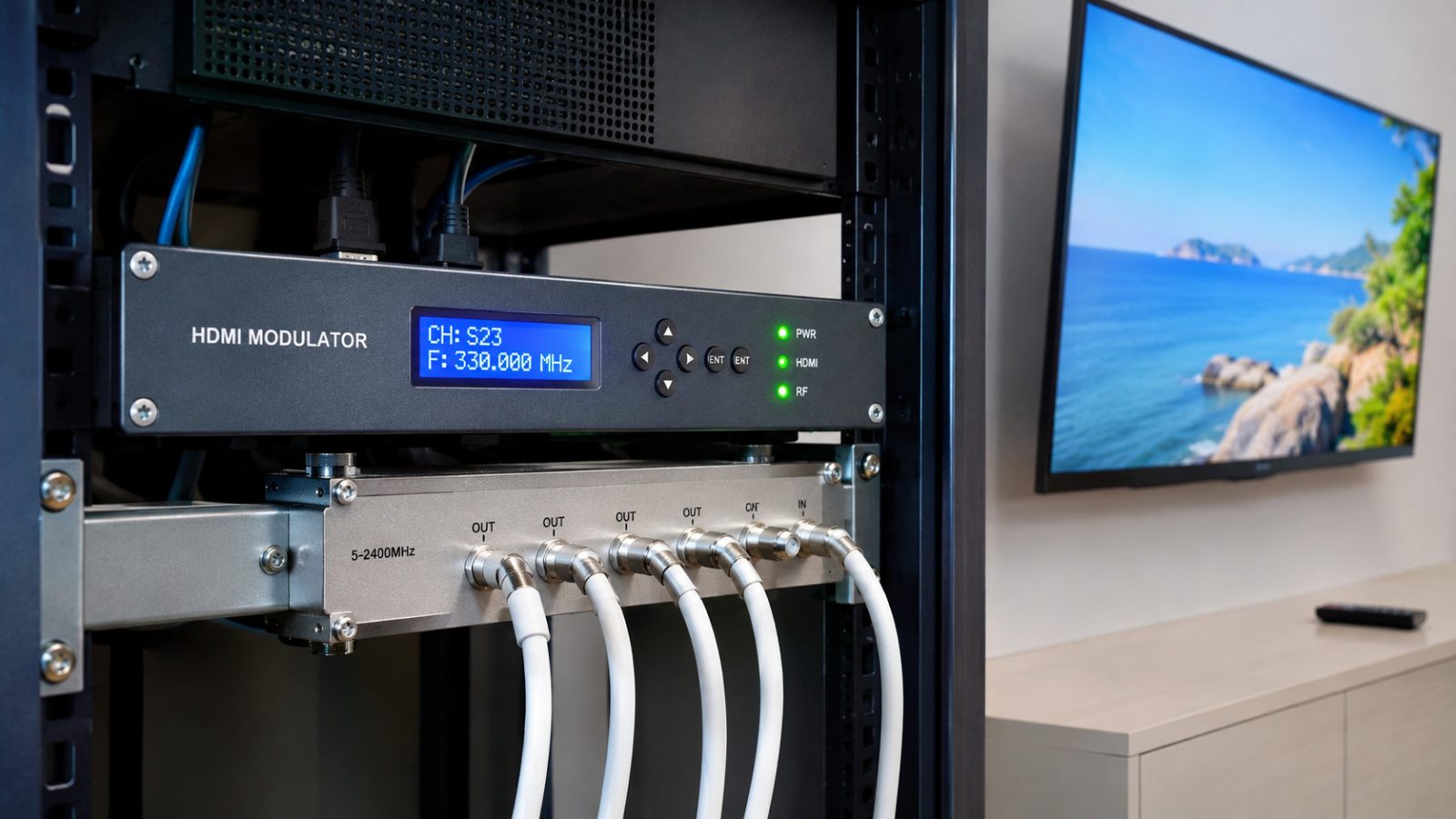
Distributing high-definition video signals to multiple televisions can be challenging, especially in buildings where coaxial cable infrastructure is already installed. While HDMI provides excellent digital video and audio quality, it is primarily designed for direct connections between devices rather than large-scale television distribution. Fortunately, modern HDMI to coax distribution technology makes it possible to transmit video from HDMI sources to multiple televisions using existing coaxial cables. With an HDMI RF modulator, organizations can convert signals from satellite receivers, media players, computers, CCTV systems, and other compatible HDMI devices into digital television channels. These channels can then be distributed through standard coaxial networks and received by televisions with compatible digital tuners. This solution is particularly useful in hotels, hospitals, restaurants, sports bars, residential buildings, schools, and commercial facilities that need to display the same video content across multiple screens. In this guide, we explain how to distribute HDMI sources to TVs over coax, what equipment is required, how HDMI modulation works, and how to design a reliable television distribution system.
What Is HDMI Over Coax Distribution?
HDMI over coax distribution is a method of transmitting video and audio from an HDMI source through a coaxial cable network. There are two main approaches to this technology: digital RF modulation and point-to-point HDMI extension. For distributing video to multiple televisions, digital RF modulation is generally the more practical option. An HDMI RF modulator receives an HDMI signal, encodes the video and audio into a suitable format, and converts the resulting digital transport stream into a television RF channel. The RF signal travels through coaxial cables, splitters, and distribution amplifiers until it reaches the connected televisions. Each television can then tune to the channel using its built-in digital tuner, provided that it supports the selected modulation standard and codecs. Unlike conventional HDMI splitters, an RF modulation system does not require a separate HDMI connection from the source to every television.
How Does an HDMI to RF Modulator Work?
An HDMI RF modulator acts as a bridge between modern HDMI equipment and traditional coaxial television infrastructure. The conversion process typically involves several stages.
1. HDMI Signal Input
The modulator receives digital video and audio from an HDMI source.
Common sources include:
- Satellite and cable television receivers
- Digital signage players
- Computers and laptops
- CCTV DVR and NVR systems
- Media players and presentation systems
- Video production equipment
The source must provide a compatible output resolution, refresh rate, audio format, and content protection configuration.
2. Video and Audio Encoding
The incoming HDMI signal is processed and compressed using a supported video codec, commonly MPEG-2 or H.264/AVC. Some advanced systems may support additional compression technologies. The encoded video and audio are packaged into a digital transport stream suitable for broadcasting.
3. RF Modulation
The modulator converts the transport stream into a digital RF television signal. Depending on the equipment and regional broadcasting requirements, the output may use DVB-T, DVB-C, ATSC, J.83 Annex B QAM, or ISDB-T. These standards are not interchangeable, so the selected output must match the receiving television tuners.
4. Coaxial Distribution
The modulated signal is transmitted through the existing coaxial cable network. Splitters and distribution amplifiers allow the same television channel to reach numerous receivers. Each television independently tunes to the RF channel, enabling viewers to watch the distributed HDMI content.
Equipment Required for HDMI to Coax Distribution
A reliable HDMI-to-coax installation requires several components.
HDMI RF Modulator
The HDMI RF modulator is the central component of the system. It converts an HDMI input into a digital television RF signal compatible with the selected broadcasting standard. When choosing a modulator, consider the supported HDMI resolutions, video encoding formats, modulation standards, output frequency range, and RF output power. For installations with several HDMI sources, multi-input modulators can reduce equipment requirements and simplify management.
Coaxial Cables
Standard 75-ohm coaxial cables, such as RG6, are commonly used for television distribution. Existing coaxial infrastructure can often be reused if the cables, connectors, and distribution components are in good condition. Cable quality and installation length influence signal attenuation, especially at higher RF frequencies.
RF Splitters and Combiners
RF splitters divide the television signal between multiple outputs. Combiners are used when signals from several modulators or other compatible RF sources must share one distribution network. Proper frequency planning is necessary to prevent channel conflicts.
Distribution Amplifiers
Large installations may require RF amplifiers to compensate for losses caused by long cable runs, splitters, and other passive components. Amplification must be carefully adjusted because excessive signal levels can also cause receiver problems.
Compatible Televisions
Each television must support the selected RF standard and encoded video format. For example, a DVB-C modulator requires a compatible DVB-C television tuner or set-top box. A television that supports DVB-T but not DVB-C may be unable to receive a DVB-C modulated signal.
Step-by-Step Guide: How to Distribute HDMI to Multiple TVs Over Coax
Step 1: Identify the HDMI Sources
Start by determining which video sources need to be distributed. For example, a sports bar may require three satellite receivers, each showing a different sports channel. A hotel may need one HDMI source for an information channel and another for promotional content. Each independently selectable HDMI source generally requires its own encoded television service, although professional multi-input equipment may combine several services into one RF multiplex.
Step 2: Connect the HDMI Source to the Modulator
Connect the HDMI output of the source device to the HDMI input of the RF modulator. Make sure both devices support compatible video and audio settings. For initial testing, a commonly supported HD output mode such as 1080p may be suitable, but the exact resolution and frame rate must match the modulator specifications. Check whether the source uses HDCP content protection. Protected HDMI signals may be rejected by incompatible equipment, and redistribution must comply with the applicable content rights and licensing agreements.
Step 3: Configure the RF Output
Access the modulator configuration interface. Depending on the model, settings may be available through front-panel buttons, an LCD screen, or a web-based management interface.
Configure the following parameters:
- Digital television modulation standard
- RF output frequency or channel
- Video encoding settings
- Audio compression format
- Output bitrate
- Service name and channel identifiers
- RF output level
Select an unused frequency within the permitted channel plan. Avoid overlapping existing television services.
Step 4: Connect the Coaxial Distribution Network
Connect the modulator RF output to the coaxial distribution infrastructure. For a small installation, the signal may pass through a splitter to several televisions. Larger installations may require RF combiners, amplifiers, taps, and additional splitters. Ensure that all components support the frequencies used by the system. Properly terminate unused coaxial ports where required to minimize reflections and signal problems.
Step 5: Scan for Channels on the TVs
Once the RF signal is available, perform a channel scan on each television. Select the appropriate tuning mode, such as digital cable for DVB-C or digital antenna for DVB-T. The television should detect the newly generated digital service. If the modulator supports configurable service names, the channel may appear under a recognizable name in the television's channel list.
Step 6: Test the Installation
Check that every television receives stable video and audio. Test the system with several televisions operating simultaneously. Verify picture quality, audio synchronization, channel switching, and RF signal stability. In larger installations, use a suitable RF meter to measure signal level, modulation error ratio, and other relevant quality indicators.
Common Applications of HDMI to Coax Distribution
Hotels and Hospitality
Hotels can use HDMI RF modulators to distribute welcome channels, promotional videos, and informational content to guest-room televisions. This enables centralized content delivery while utilizing existing coaxial infrastructure.
Sports Bars and Restaurants
Sports bars often need to display several television broadcasts across numerous screens. By connecting different receivers to separate modulator inputs, operators can create dedicated RF channels for different programs. Staff can then select the desired broadcast using each television's remote control.
CCTV Monitoring
Security facilities can distribute video output from compatible CCTV recorders to multiple televisions. This allows monitoring screens to display surveillance feeds without requiring individual HDMI connections over long distances.
Schools and Universities
Educational institutions can distribute presentation content, internal announcements, and authorized video programming to televisions across classrooms and shared spaces. Residential and Commercial Buildings Apartment buildings, offices, and commercial properties may use HDMI modulation to integrate shared informational or entertainment channels into existing television systems.
Troubleshooting Common HDMI to Coax Problems
Although HDMI RF distribution is relatively straightforward, several technical problems may occur.
No Channel Detected
If televisions cannot find the generated channel, check the modulator frequency, RF standard, symbol rate where applicable, and receiver tuning mode. Confirm that the modulator output reaches the coaxial network.
Black Screen
A black screen may indicate an incompatible HDMI format, an HDCP restriction, or a video codec unsupported by the television. Test with a known-compatible, unprotected HDMI source and verify the modulation settings.
Pixelation or Signal Loss
Pixelation usually indicates poor RF signal quality or errors in the encoded stream. Inspect coaxial connectors, signal levels, splitters, and amplifier configuration. Measure MER and relevant error statistics to identify RF problems.
No Audio
Audio problems may occur when the television does not support the audio format generated by the modulator. Configure a compatible audio codec and verify that the source is providing audio correctly.
Video Delay
Digital RF modulators require time for video encoding, multiplexing, transmission, and receiver decoding. Consequently, some latency is normal. For applications requiring synchronized displays or real-time interaction, evaluate the actual end-to-end delay before deployment.
Best Practices for Professional HDMI Distribution
Reliable HDMI-to-coax systems require careful equipment selection and RF network planning. Choose modulators that support the television standards used in the installation. Verify HDMI source compatibility and ensure that redistribution is authorized. Plan RF frequencies to avoid interference with existing services. Use properly installed 75-ohm coaxial cables and suitable RF distribution components. Maintain appropriate signal levels throughout the building. For multiple HDMI inputs, consider professional headend equipment with centralized monitoring and configurable service information. Regularly inspect cable connections, modulator status, and RF quality to maintain reliable operation. In larger systems, documenting frequencies, channel assignments, equipment settings, and distribution paths significantly simplifies future maintenance. Distributing HDMI sources to TVs over coax is an effective way to extend modern digital video content throughout buildings with existing television cabling. Using an HDMI RF modulator, operators can convert compatible HDMI signals into digital television channels that are distributed through standard coaxial networks. This approach reduces the need for individual long-distance HDMI connections and allows multiple televisions to receive centrally managed video content. From hotels and sports bars to hospitals, educational facilities, and commercial properties, HDMI-to-coax technology provides a flexible solution for distributing video across multiple screens. Successful implementation depends on selecting the correct modulation standard, ensuring compatibility with television receivers, planning RF frequencies, and maintaining adequate signal quality. With properly configured equipment and reliable coaxial infrastructure, HDMI RF distribution can deliver stable, high-quality television services while making effective use of existing installations.




1 thought on “How to Distribute HDMI Sources to TVs Over Coax: A Complete Guide”