Key Takeaways
- Virtual storage planning must account for capacity, IOPS, latency, throughput, availability, and growth.
- Workload behavior matters more than a simple estimate of required terabytes.
- Snapshots and replication support recovery, but they do not replace independent backups.
- The best architecture balances performance, resilience, security, expansion, and cost.
Virtual environments now support far more than a handful of server workloads. They may host line-of-business applications, databases, virtual desktops, analytics systems, containers, and AI-related services. That broader mix makes storage design a direct factor in application responsiveness, uptime, backup windows, and recovery readiness.
For organizations evaluating shared infrastructure, Nfina’s storage area network solutions for virtualized workloads explain how shared block-level storage can support scalable capacity, snapshots, replication, and resilient access paths. Nfina specializes in business storage systems and also offers related data storage consulting, backup and disaster recovery support, hybrid cloud options, and technical assistance, which are all relevant when planning storage for critical virtual machines.
Why Storage Planning Matters More In 2026
A weak storage design can cause VM contention, uneven application performance, long restore times, and backup activity that interferes with production workloads. It can also make platform changes more difficult when an organization adds cloud services, adopts containers, or moves workloads to another hypervisor. Planning early helps teams build an environment that can adapt without requiring an immediate redesign.
Start With Workload Behavior, Not Storage Size
Capacity is necessary, but it is only one part of the decision. Begin by identifying whether each workload is read-heavy, write-heavy, mixed, steady, or bursty. A transactional database may need consistently low latency, while a reporting platform may need high throughput during scheduled processing periods. Virtual desktop environments often create predictable login storms, and backup jobs can generate substantial sequential I/O.
Measure demand at peak periods rather than relying on daily averages. A system with modest average utilization can still perform poorly if many VMs compete for storage simultaneously. Record read and write ratios, I/O sizes, queue depth, latency, and throughput before selecting media or architecture.
The Five Measurements That Shape A Good Design
- Capacity: Estimate usable space today, then include anticipated growth, snapshots, replicas, and reserve capacity.
- IOPS: Determine how many read and write operations the storage must process during busy periods.
- Latency: Set realistic response-time expectations for applications that are sensitive to delays.
- Throughput: Account for the volume of data moved by backups, analytics, migration, and bulk processing.
- Availability: Define the amount of downtime each application can tolerate.
Two environments may each need 50 TB of usable storage but require very different designs. A file archive may prioritize economical capacity, while a group of database VMs with the same space requirement may need faster media, redundant paths, and tighter latency controls.
Choose The Right Storage Architecture
- Direct-attached storage: Often suits smaller deployments or workloads where local performance and simplicity are the priority.
- Network-attached storage: Provides file-level access and can be a practical fit for shared files, home directories, and file-based applications.
- Storage area networks: Provide shared block-level storage for VMs, databases, and other workloads that benefit from centrally managed volumes.
- Hyperconverged infrastructure: Combines compute and storage in a cluster, which can simplify operations but may tie storage growth to node expansion.
- Cloud and hybrid storage: Can extend recovery options, geographic reach, and capacity flexibility when designed with data movement and cost controls in mind.
Match Storage Media To Workload Needs
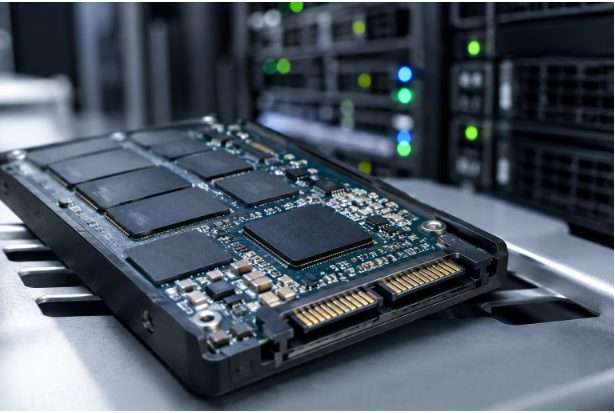
Hard disk drives remain useful for backups, archives, and capacity-oriented tiers. SSDs generally provide lower latency for active VM disks and databases, while NVMe can help high-concurrency workloads that require faster data access. Tiering can place active data on faster media while retaining less-used data on lower-cost capacity tiers.
An all-flash design is not automatically necessary for every workload. The goal is predictable performance where it matters most. Recent SSD performance research also highlights why large storage environments increasingly focus on reducing variability across pooled drives rather than simply adding faster devices.
Build In Resilience And Recovery
Resilience involves more than extra disks. Critical environments may need redundant controllers, power supplies, network paths, disk groups, and site-level recovery planning. Production data should remain separate from backup copies, and failover procedures should be tested rather than assumed to work during an outage.
Snapshots capture a point-in-time state and can support quick rollback after accidental deletion or a failed update. Clones create usable copies, backups provide independent recovery copies, and replication transfers data to another system or location. Recovery point objective, or RPO, defines how much data loss is acceptable. Recovery time objective, or RTO, defines how quickly a service must be restored.
Snapshots should not be the only protection because they can remain exposed to the same storage failure, attack, or administrative error as production data. Independent, isolated, or immutable backup copies add another layer of ransomware recovery protection. Current virtualization storage developments also show increased attention on integrated disaster recovery and storage support for virtual machines running alongside cloud-native platforms.
Design For Security, Growth, And Platform Change
Use role-based access controls so administrators receive only the permissions required for their responsibilities. Protect management interfaces with strong authentication and network separation, encrypt data when appropriate, monitor unusual storage activity, and keep firmware and management tools updated.
For growth planning, distinguish raw capacity from usable capacity. Include the overhead created by redundancy, snapshots, replicas, and temporary migration workloads. Review utilization before the platform reaches its practical limit, then choose an expansion path that avoids an emergency purchase or disruptive migration.
Storage should also remain useful if the organization changes hypervisors or adds containers, cloud services, edge systems, or a second virtualization platform. Reviewing compatibility and data mobility before entering a long-term infrastructure agreement can reduce lock-in and operational risk.
A Practical Storage Planning Checklist
- List every workload and classify its I/O behavior.
- Measure current capacity, IOPS, latency, throughput, and growth.
- Set RPO and RTO targets for critical applications.
- Map failure points across disks, controllers, networks, power, and sites.
- Select an appropriate mix of HDDs, SSDs, NVMe drives, and cloud tiers.
- Confirm compatibility with current and future platforms.
- Test restores and failover before production deployment.
- Review performance and access controls regularly.
Common Questions About Virtualization Storage
How Much Storage Does A Virtual Environment Need?
The answer depends on VM images, application data, snapshots, backups, redundancy, and expected growth. Calculate usable capacity, not just raw disk totals.
Is SAN Storage Always Faster Than NAS?
No. SAN and NAS use different access models. Performance depends on the workload, hardware, network design, configuration, and operational practices.
Are Snapshots A Replacement For Backups?
No. Snapshots are valuable for quick rollback, but independent backup copies remain necessary for broader failure and ransomware recovery scenarios.
Conclusion
Effective storage planning balances speed, capacity, availability, security, recovery, and flexibility. The strongest design is not necessarily the largest or most expensive. It is the one that reflects real workload behavior, protects essential data, and leaves room for the virtual environment to change over time.