
Next-Generation IDE Assistants: Comparing Cursor, Copilot, and Windsurf
The world of software development moves fast. By October 2026, Artificial Intelligence (AI) is no longer a futuristic concept. It is a key part of how we build software every day. These AI tools promise to save countless hours. They boost our productivity and reduce tedious tasks.
From writing code to debugging complex issues, AI is changing our workflows. We now have powerful assistants in our Integrated Development Environments (IDEs). We also use autonomous agents that can tackle entire projects. This article will guide you through the best AI tools available. We will compare their features. We will also show how developers use them to gain an edge. For those looking to integrate AI strategically across their organization, exploring strategic AI solutions can offer valuable insights.
Join us as we uncover the most impactful AI tools for software development.

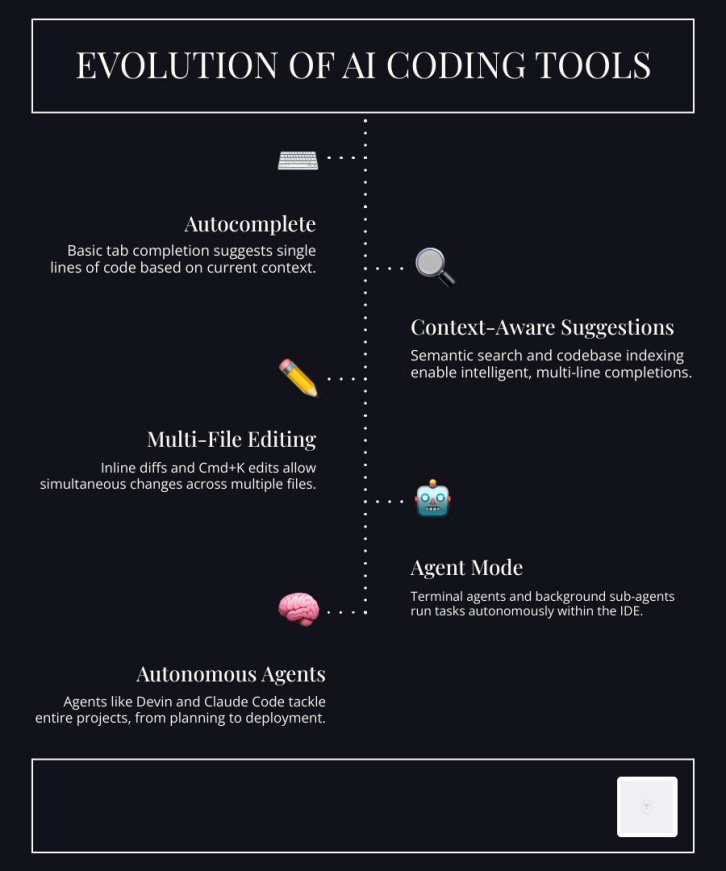
The modern Integrated Development Environment (IDE) is no longer just a code editor; it’s a collaborative partner powered by AI. By October 2026, tools like Cursor, GitHub Copilot, and emerging platforms such as Windsurf have redefined how developers interact with their codebases. These assistants integrate deeply into our workflows, offering everything from intelligent code completion to multi-file editing and agentic capabilities.

To help us navigate the landscape of these powerful tools, let’s look at a comparison of their core features:
Feature Cursor GitHub Copilot Windsurf Context Indexing Complete codebase understanding, semantic search, multi-file awareness Limited to current file/project, extensions for broader context Advanced context management, multi-file editing Multi-Model Support GPT, Opus, Gemini, Grok Code, Cursor models OpenAI models, specific language models Various LLMs, potential for BYOK Pricing Tiers Free (2K completions), Paid ($20/month unlimited) Free (2K completions, 50 chat), Paid ($10/month unlimited) Varies, often subscription-based Multi-File Editing Cmd+K edits, agentic mode for complex tasks Primarily single-file suggestions, chat for multi-file context Designed for multi-file operations In-Editor Code Completion and Semantic Context Indexing
At the heart of these IDE assistants is intelligent code completion, often referred to as “tab completion” on steroids. Tools like Cursor pride themselves on “magically accurate autocomplete,” which predicts our next line of code with remarkable precision. This goes beyond simple keyword matching; it leverages sophisticated codebase indexing and semantic search.
Semantic context indexing allows these tools to understand the entire project, not just the file we’re currently editing. Cursor, for instance, offers “complete codebase understanding regardless of scale or complexity.” This means we can ask questions like “Where are these menu label colors defined?” and the AI can pinpoint the exact location, even across numerous files and directories. This capability is crucial for navigating large existing codebases, where developers spend a significant portion of their time understanding rather than writing new code. Context engines and model routing ensure that the most relevant information is fed to the underlying language models, leading to more accurate and helpful suggestions.
Multi-File Editing, Agent Mode, and Terminal Integration
Beyond simple completions, the evolution of IDE assistants has led to more advanced features like multi-file editing and “agent mode.” In Cursor, for example, the Cmd+K command allows us to initiate targeted edits that can span multiple files, automatically applying changes across the codebase based on a prompt. This drastically reduces the manual effort required for refactoring or implementing cross-cutting concerns.
The true power emerges with agentic capabilities and terminal integration. Cursor offers an “autonomy slider,” allowing us to control the AI’s independence, from simple suggestions to full agentic development. In this mode, AI agents can act as background sub-agents, running tasks in the terminal, interacting with Git for commits and branches, and even deploying changes. This allows us to delegate complex tasks, such as building an interactive research dashboard, to an AI agent that can explore files, wire up data, add components, and deploy to a staging environment—all autonomously. The integration with Git means these tools can automatically generate inline diffs, making it easier for human developers to review and approve AI-generated changes.
Autonomous Coding Agents and Strategic AI Solutions for Enterprise Scale
The next frontier in AI for software development is the rise of autonomous coding agents. These aren’t just assistants; they are virtual engineers capable of tackling complex, multi-step tasks, often with minimal human intervention. By October 2026, agents like Devin, Codex, Claude Code, and opencode are demonstrating significant efficiency gains, particularly in enterprise environments.
Here’s how some of the leading autonomous coding agents compare:
Agent Autonomy Level Multi-Agent Support Repository Scalability Key Use Cases Devin High (self-improving, tool-building) Yes (fleet of Devins) Millions of lines, deep dependencies ETL refactoring, large-scale migrations Codex High (end-to-end task completion) Yes (worktrees) Large existing codebases PRs, refactors, testing, documentation Claude Code Moderate to High (workflow-dependent) Yes (orchestration) Varies with context management Debugging, code generation, refactoring opencode Configurable Yes Varies with LLM choice Custom agentic workflows, parallel tasks Enterprise Case Studies: Devin and Complex Monolith Refactoring
One of the most compelling real-world applications of autonomous agents comes from Nubank, a leading digital bank. They leveraged Devin to refactor an 8-year-old ETL monolith containing millions of lines of code. This wasn’t a small task; it involved migrating over 100,000 data class implementations with dependencies up to 70 deep.
The results were transformative: Nubank achieved an astounding 8-12x engineering time efficiency gain and over 20x cost savings on the migration scope. Devin was fine-tuned on manual examples, enabling it to perform autonomous, parallel migrations under human oversight. It even self-improved by building custom tools and scripts to handle repetitive subtasks, such as detecting country extensions like ‘br’, ‘co’, ‘mx’. This allowed engineers to delegate the tedious work, focusing instead on verifying and approving Devin’s changes. The task time for data class migration was reduced from 40 minutes to just 10 minutes, a 4x speed improvement. This case study powerfully illustrates how AI agents can tackle high-volume, repetitive, yet complex tasks that are too intricate for simple scripting but ideal for AI after initial training.
Implementing Strategic AI Solutions in Team Workflows
Integrating autonomous agents and other AI tools into team workflows requires a strategic approach. It’s not just about individual productivity; it’s about enhancing the entire Software Development Life Cycle (SDLC). We can implement AI for CI/CD automation, where agents monitor pipelines, identify failures, and even suggest fixes.
A critical aspect is maintaining human-in-the-loop oversight. While agents can work autonomously, human engineers remain responsible for project management, reviewing AI-generated changes, and making final approvals. Tools like Cursor integrate with GitHub for PR reviews, and Devin links with Linear for task management and Slack for alerts, ensuring seamless collaboration. This allows engineers to focus on higher-level system design and verification, rather than execution. For organizations aiming to optimize their development processes with advanced AI, exploring various Strategic AI solutions can provide a roadmap for successful integration and governance. This ensures that AI tools enhance, rather than disrupt, existing team dynamics and security protocols.
Open-Source Agents: Cline, Roo-Cline, and OpenHands
While commercial agents like Devin and Codex offer powerful capabilities, the open-source community is also rapidly advancing. Projects like Cline, Roo-Cline, and OpenHands provide developers with flexible, customizable alternatives. These tools often support Bring-Your-Own-Key (BYOK) models, allowing developers to choose their preferred LLMs, including local LLMs for enhanced privacy and control.
Roo-Cline, in particular, has received praise for its recent updates, indicating a strong community-driven development effort. Open-source agents offer more flexibility for custom system prompts and integration into unique development environments. They empower developers to build bespoke agentic workflows without being locked into proprietary ecosystems, fostering innovation and adaptability.
Rapid Full-Stack Prototyping: From Bolt.new to v0 and Replit
The speed at which we can move from an idea to a functional prototype has dramatically increased with AI-powered prototyping tools. By October 2026, platforms like Bolt.new, v0, Replit, and Lovable (GPTEngineer) are making it easier than ever to scaffold full-stack web applications in minutes, not days.
Let’s compare some of these rapid prototyping tools:
Tool Token Limits (Free Tier) Tech Stacks Supported Exportability Backend Integration Bolt.new 150K daily, 1M monthly Frontend-focused, some backend Yes Limited v0 Varies, often credit-based React, Vue, Svelte Yes Limited Replit Generous, cloud-based environment Multi-language, full-stack Yes Full-stack Lovable (GPTEngineer) Varies, often credit-based Full-stack, various frameworks Yes Full-stack Browser-Based Dev Environments and Instant Scaffolding
These tools excel by providing browser-based development environments, often leveraging technologies like WebContainers for instant setup. They can generate entire application structures, including UI components (e.g., shadcn components), mock databases, and API endpoints, based on natural language prompts. This instant scaffolding allows developers to visualize and interact with their ideas almost immediately.
Platforms like Bolt.new focus on rapid frontend generation, offering live previews and quick iterations. Replit, while sometimes categorized as a prototyping tool, is a full cloud development environment that supports multi-language, full-stack development with instant deployment capabilities. For those seeking more flexibility, open-source alternatives like spark-stack offer minimalist UIs and support arbitrary Docker containers, providing more control than some proprietary solutions like v0. This flexibility is crucial for developers who need to integrate custom services or specific backend technologies.
Evaluating Strategic AI Solutions for Web Prototyping
When evaluating these tools, we consider factors beyond just speed. Frontend generation capabilities are paramount, allowing designers and developers to quickly iterate on user interfaces. The ability to integrate with mock databases or generate basic backend logic is also key for full-stack prototypes. Developers must also pay attention to token consumption, especially with free tiers. Bolt.new, for example, offers a generous free tier of 150K daily and 1M monthly tokens, making it accessible for initial experiments.
The exportability of the generated code is another critical consideration, ensuring that prototypes can be easily transferred to a production-ready development environment. These tools are invaluable for client demos, allowing stakeholders to experience a functional application early in the development cycle, fostering better feedback and alignment.
Multi-Tool Orchestration, Free Ecosystems, and Maintenance Guardrails
The complexity of modern software development often requires a combination of AI tools, each excelling in a particular area. Effective developer workflows in October 2026 involve orchestrating these tools, leveraging free ecosystems, and implementing guardrails to manage maintenance challenges.
The Claude-Cursor-Gemini Debugging Pipeline and Google AI Studio
A popular and highly effective multi-tool workflow for developers involves a tri-tool debugging pipeline: Claude, Cursor, and Gemini. Developers often start by generating initial files or tackling complex logic with Claude 3.5, leveraging its strong reasoning capabilities. Once the code is generated, it’s brought into Cursor for codebase chatting, multi-file editing (Ctrl+Enter with specific prompts), and applying changes directly within the IDE.
However, when developers encounter circular bug loops or particularly stubborn issues that Claude or Cursor struggle with, they often turn to Gemini. Specifically, some developers recommend using Gemini 2 Exp 1206 for debugging when other tools get stuck. This highlights the strength of combining different models, each with its unique strengths, to overcome limitations.
Google also offers a compelling free ecosystem for developers. Gemini Code Assist provides up to 180,000 code completions per month at no cost, integrating directly into popular IDEs like VS Code and JetBrains. Google AI Studio allows developers to prototype with Gemini models directly in the browser, and the Gemini CLI enables direct integration into terminal workflows. For more advanced agentic development, Google Antigravity is an agent-first IDE that coordinates multiple AI agents across the codebase, using Gemini models to build and refactor applications. This suite of tools provides a powerful, accessible entry point for integrating AI into development stacks.
Workflow Orchestration with Port and n8n
As we integrate more AI agents and tools, managing their interactions and ensuring coherent workflows becomes crucial. This is where orchestration platforms like Port and low-code solutions like n8n come into play. Port positions itself as an essential platform for agentic engineering, offering orchestration, governance, and a “context lake” to make AI agents safer and more productive across the SDLC. It helps manage the context that agents need to operate effectively, preventing chaos and ensuring guardrails.
n8n, on the other hand, is a powerful workflow engine that allows us to chain AI tasks into end-to-end automations. While pure AI coding tools are excellent for code generation, n8n often outperforms AI-generated code for production-ready automation due to its battle-tested engine and native AI integrations. It provides a deterministic, reliable way to automate processes, making it ideal for integrating AI into Sec/IT/DevOps workflows. n8n’s ability to orchestrate complex API chains and manage data flow between various services complements generative AI tools by providing the backbone for robust, scalable systems.
Overcoming Maintenance Debt, Review Fatigue, and Hallucinations
The adoption of AI tools is not without its challenges. AI-generated code can sometimes lead to maintenance debt due to inconsistent naming, outdated patterns, or integration issues with existing codebases. Developers also face review fatigue when constantly scrutinizing AI output. Furthermore, AI models can “hallucinate,” generating plausible but incorrect code or explanations.
To mitigate these issues, we must adopt best practices. Treating AI as an “eager but inexperienced teammate” helps calibrate expectations. Custom instructions are vital for guiding AI to adhere to specific coding styles, tech stacks, and known pitfalls. Breaking tasks into small, concrete subtasks and starting new conversations frequently helps prevent context degradation. Test-driven verification and robust static analysis are essential feedback loops to reduce review fatigue and catch errors early. When AI-generated code is problematic, developers should be prepared to revert changes and reflect on better prompting or artisanal coding. For large existing codebases, modular refactoring, guided by AI but carefully reviewed by humans, is key to managing complexity.
Frequently Asked Questions About AI Coding Tools
As AI tools become more integrated into our development practices, several common questions arise regarding their practical implementation and long-term implications.
What is the most cost-effective pricing model for AI developer tools?
The most cost-effective pricing model depends heavily on individual or team usage patterns. We see a variety of models in October 2026:
- Free Tiers: Many tools offer generous free tiers. Cursor’s free tier provides 2,000 completions, while GitHub Copilot offers 2,000 completions and 50 chat messages per month. Google Cloud’s Gemini Code Assist provides up to 180,000 code completions monthly at no cost. These are excellent for individual developers or small teams to experiment and integrate AI without upfront investment.
- Flat-Rate Subscriptions: Tools like GitHub Copilot offer unlimited usage for a flat fee (e.g., $10/month). This provides predictability for consistent, high-volume users. Cursor’s paid tiers start from $20/month for unlimited completions.
- Credit-Based Systems: Some tools operate on a credit system, where users purchase credits that are consumed based on API calls or token usage. This can be cost-effective for intermittent use but requires careful monitoring to avoid unexpected charges.
- Bring-Your-Own-Key (BYOK): Many platforms allow developers to use their own API keys for underlying LLMs (e.g., OpenAI, Anthropic). This offers flexibility in model choice and pricing, as the cost is directly tied to the LLM provider’s rates. It also provides more control over data privacy.
For most developers, starting with free tiers is advisable to evaluate tools, then transitioning to flat-rate subscriptions for predictable, heavy usage, or BYOK for custom model integration and cost control.
How do coding agents handle large legacy codebases without breaking dependencies?
Handling large legacy codebases is a significant challenge, but modern coding agents are increasingly equipped for it. Their strategies include:
- Semantic Indexing: Agents like Cursor create a comprehensive semantic index of the entire codebase. This allows them to understand the relationships between files, functions, and variables, even across millions of lines of code. When a change is proposed, the agent can analyze its impact on dependent components.
- Dependency Tree Mapping: Advanced agents can map complex dependency trees, identifying upstream and downstream effects of modifications. This is crucial for refactoring tasks, such as Nubank’s ETL monolith migration, where dependencies could be 70 layers deep.
- Human-in-the-Loop Review: Despite their autonomy, agents are typically integrated with human oversight. Changes proposed by agents are presented as pull requests or diffs, allowing human engineers to review, validate, and approve them. This acts as a critical safety net against breaking dependencies.
- Modular Migration: For massive refactoring projects, agents can break down the task into smaller, modular migrations. Devin, for example, handled 100,000+ data class implementations by processing them in parallel subtasks, each with its own set of checks and balances.
- Custom Instructions and Context: Developers can provide agents with custom instructions, style guides, and explicit context about the codebase’s architecture and common pitfalls. This guides the agent to make changes that align with existing patterns and avoid introducing new issues.
While agents significantly accelerate work on legacy codebases, human expertise remains indispensable for strategic guidance and final validation.
Why are low-code platforms like n8n used alongside generative AI tools?
Low-code platforms like n8n complement generative AI tools by providing a reliable, production-ready framework for automation, especially in areas where the deterministic nature of low-code outweighs the creative output of AI.
- Deterministic Automation: Generative AI is excellent for creating code and content, but its output can be unpredictable. For critical business processes, IT operations, or security workflows, deterministic automation is paramount. n8n offers battle-tested engines that execute workflows reliably every time, reducing the risk of errors that could arise from AI hallucinations or unexpected outputs.
- Production Stability: While AI can generate code for automation, deploying and maintaining AI-generated automation code in production can introduce new challenges. n8n provides a stable, managed environment for building and running workflows, with built-in error handling, logging, and monitoring capabilities that are essential for production systems.
- Multi-System Orchestration: Modern applications often involve numerous APIs, databases, and third-party services. n8n excels at orchestrating complex interactions between these disparate systems without writing extensive custom code. It can chain AI tasks (e.g., using an LLM to extract data, then passing it to a CRM via n8n) with other actions, creating sophisticated end-to-end workflows.
- AI Integrations: Rather than replacing AI, n8n integrates with it. It can leverage AI models for specific steps within a larger workflow, such as using a sentiment analysis AI before routing customer feedback, or using a code-generating AI to create a small script that n8n then executes. This allows developers to harness AI’s power within a controlled, robust framework.
- Reduced Development Time for Automation: For many automation tasks, building a workflow in n8n is significantly faster and more maintainable than writing custom code, whether by hand or with AI assistance. It frees developers to focus on core product development, while IT or operations teams can build and manage their own automations.
Generative AI creates the building blocks, and low-code platforms like n8n provide the reliable scaffolding and plumbing to make them work together in a production environment.
Conclusion
By October 2026, AI tools have fundamentally reshaped the software development landscape. From intelligent IDE assistants that understand our entire codebase to autonomous agents tackling complex refactoring projects, and rapid prototyping tools that bring ideas to life in minutes, the impact is undeniable. We’ve seen how companies like Nubank are achieving unprecedented efficiency gains, and how developers are orchestrating multi-tool workflows to debug and build more effectively.
The key to successful AI adoption lies in strategic integration, understanding the strengths and limitations of each tool, and maintaining human oversight. As developers, we are moving towards a future of hybrid AI stacks, where continuous testing, thoughtful context management, and a focus on code quality remain paramount. Embracing these AI tools allows us to optimize developer workflows, enhance engineering productivity, and ultimately, build better software faster.